No more redrawing the chart
Repeating chores come back every day, on weekdays or on the days you choose.
 ChorePocket Get the Android app
Replace the fridge chart
A digital chore chart on your phone: everything a paper chart does, plus chores that repeat, points that add up automatically and a history you can check.
 Scan with your Android phone
14-day trial · no card · no automatic charge
Android only. The iPhone version is not available yet.
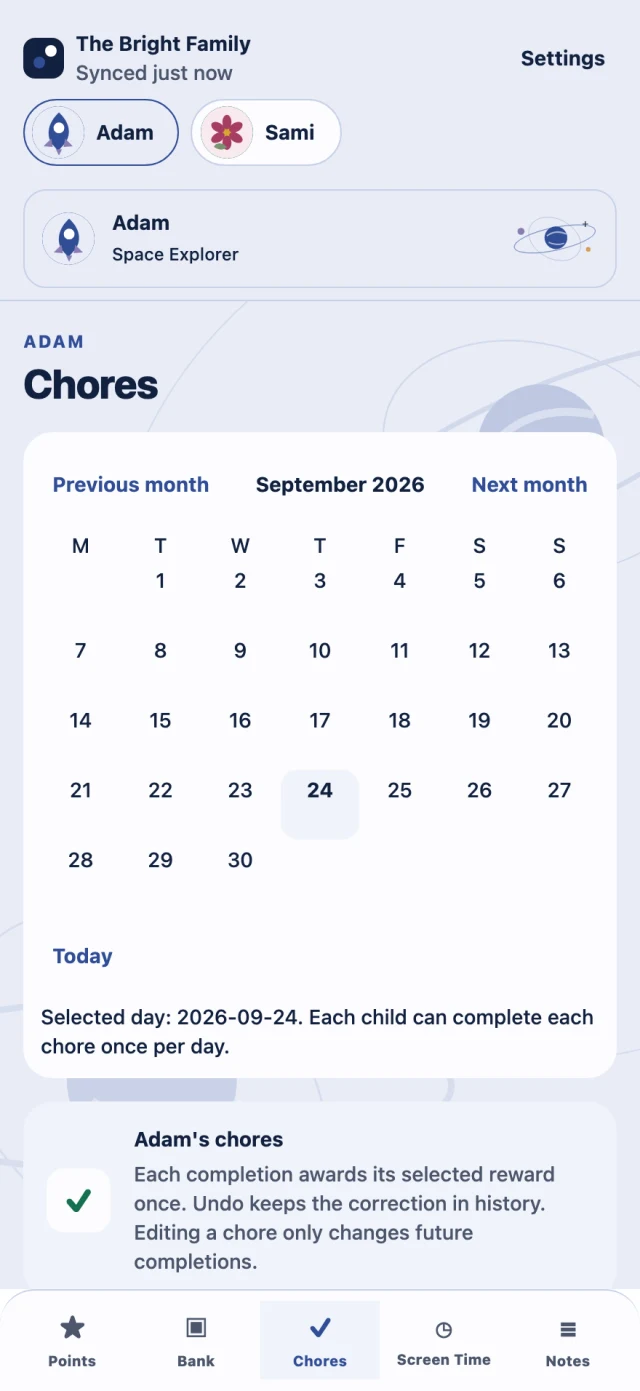

Repeating chores come back every day, on weekdays or on the days you choose.
Mark a chore done and its reward is recorded for you.
Up to five children, each with their own chores and theme.
No. ChorePocket is an app for Android phones, rather than a screen for your wall.
Yes. In ChorePocket you choose every day, weekdays or the days each chore repeats.
About 4 minutes to set up ChorePocket, and it's saved as you go.
Not yet. ChorePocket is available for Android phones on Google Play. The iPhone version is not available yet.
In the US, Family Monthly is US$2.99 a month and Family Annual is US$24.99 a year. One Family plan covers up to five children.
| Country | Family Monthly | Family Annual |
|---|---|---|
| United States | US$2.99 a month | US$24.99 a year |
| Canada | CA$4.19 a month | CA$34.99 a year |
| Australia | A$4.69 a month | A$38.99 a year |
| New Zealand | NZ$5.99 a month | NZ$49.99 a year |
| United Arab Emirates | AED 10.99 a month | AED 91.99 a year |
Plans are sold in these five countries and paid through Google Play, which shows your price, billing period and any taxes before you confirm. The trial itself never charges you. A plan you choose renews automatically, billed monthly or once a year, until you cancel it in Google Play.
Nothing is charged unless you choose a plan. Your family screens stay readable, and export and account deletion stay available; new entries pause until you subscribe. If you choose a plan during the trial, billing starts straight away and unused trial days are not added.
Android only. The iPhone version is not available yet.
14-day trial · no card · no automatic charge